 | Shop by category |
{"delay":300}
|
 |
| Announcement |
|
|
Frequently Asked Questions
Smart FAQWhat are Smart FAQs?This is a new free feature that draws on live information from your listings to answer the top 20 buyer questions before buyers reach you through the "Ask a question" or "Contact seller" links. How do I turn on my FAQs? PowerSellers and sellers who are already using FAQs will automatically have SmartFAQ turned on. Other sellers can turn on SmartFAQs by going to My eBay > Site Preferences > Selling Preferences > Manage communications with buyers. What options do I have for setting up Smart FAQs? You can set up your Smart FAQs in one of three ways:
You can change your FAQs by going to My eBay > My Account > Seller Preferences > FAQ. The FAQ Preference Page allows you to turn FAQs on and off for all items, make modifications to FAQs, turn eBay Smart FAQs on or off, or add your own FAQs. 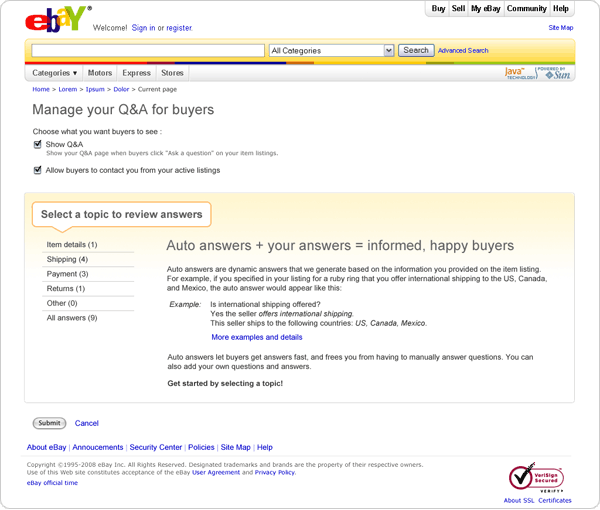
What is an eBay Smart Answer? We have identified and developed answers for the top questions typically asked by buyers. These answers draw live information from your listing and are called "eBay Smart Answers." To get the answers, eBay looks at item, shipping, and transactional information. As long as your information is up-to-date and correct, eBay can accurately answer questions for you. For example, if a buyer asks "Where is my item?" eBay checks the payment date, your handling and shipping time, and any uploaded tracking information to create the answer. How do I change, review, modify, or add to my FAQs? You can make modifications to your FAQs by going to your FAQ Preference Page. Go to My eBay > My Account > Seller Preference > FAQ. What do buyers see when they click "Ask a question"? The image below shows what the buyer will see. Please note that if you indicate that you only accept questions from buyers who've completed a transaction with you in the past, the "Can't find an answer?" box will not display. Note, choosing this option is not recommended for most sellers. Not allowing buyers to contact you could reduce your sales and have a negative impact on your Detailed Seller Ratings. 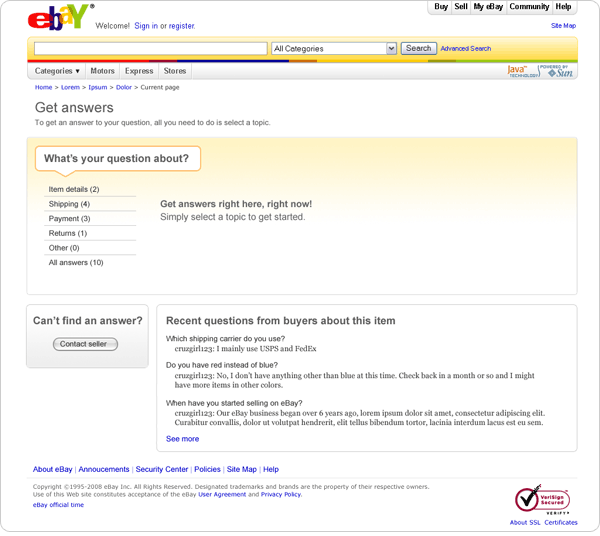
What if I want to have more control over these FAQs? If you prefer, you can opt into an application from Hosted Support, an eBay Certified Developer. Hosted Support offers an FAQ Management System that allows you to create and maintain your own FAQs. How do I opt in to Hosted Support's FAQ application? Is there a charge? If you want to use Hosted Support's FAQ Management System, you first need to sign up for it. Hosted Support is a third-party supplier, and a fee will apply. Once you've signed up, select the "FAQ through Hosted Support" option on your FAQ Preference Page. This option will not appear until you have signed up for it. If you do choose this option, you need to create and maintain your FAQs through the Hosted Support application. Package tracking in My eBayHow do I upload a tracking or delivery confirmation number so it shows up in my buyer's My eBay?If you print a shipping label through PayPal or eBay, tracking and delivery confirmation numbers will automatically appear in the buyer's My eBay. If you don't use the PayPal or eBay label printing solution, you can enter tracking information manually in My eBay. Please note that you can only upload USPS and UPS tracking information. How can I quickly learn more about uploading a tracking number? Watch this 2 minute video, How to upload tracking for shipped items. How do I upload the information manually? If you use My eBay to manage your orders, go to My eBay > Sold, select the item(s) for uploading, and click the "Add tracking number" button. 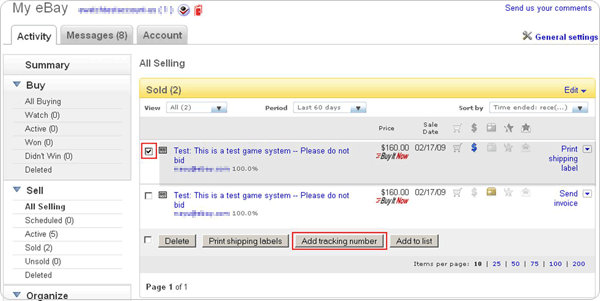
Once you click the "Add tracking number" button, you will be redirected to the Add/Edit/Delete Tracking number page where you can enter tracking numbers for the selected carrier. 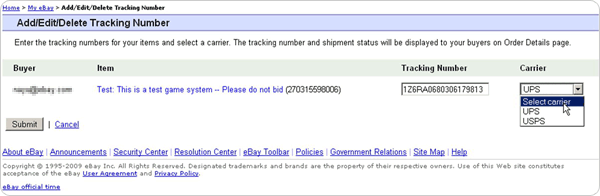
Once you submit the tracking number, an email will be sent automatically notifying your buyer. The tracking number will be displayed below the item in My eBay Sold (for the seller), My eBay Won (for the buyer), and the View Order Details page (for both parties). If you use Selling Manager Pro to manage your orders, go to Selling Manager Pro > Sold, select the appropriate item(s), and click the "Add Tracking Number" button. 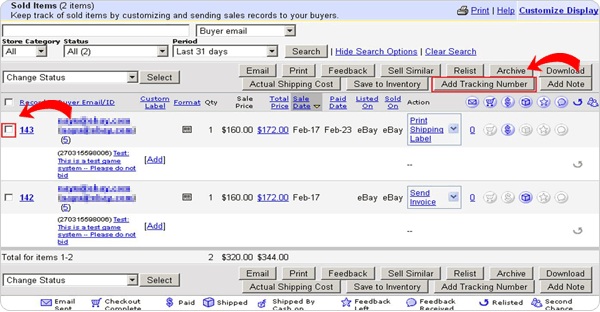
Once you've clicked on the "Add Tracking Number" button, the Add/Edit/Delete Tracking Numbers box will be displayed on the page, and you can enter the tracking number for the selected item(s). 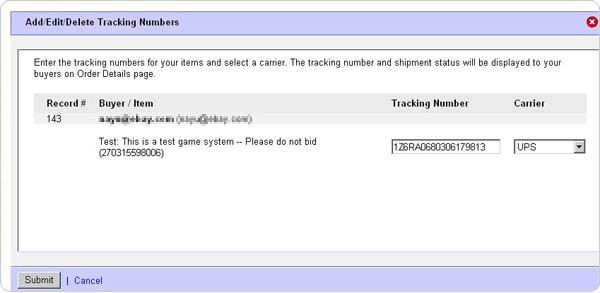
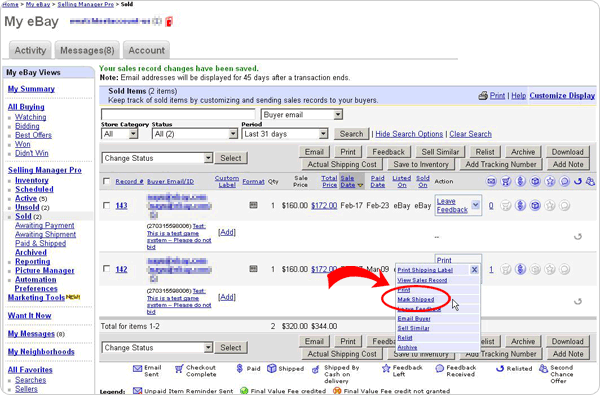
How do I mark an item as shipped? An item will be automatically marked as shipped if you print a PayPal or eBay shipping label or manually upload a tracking number. If you don't use the PayPal or eBay shipping label solution or upload a tracking number, we recommend you manually mark items as shipped once you ship them. To manually mark an item or items as shipped, go to My eBay > Sold or Selling Manager Pro > Sold and "Mark as shipped" in the drop-down menu. When you mark an item as shipped, an email will be sent automatically notifying your buyer. 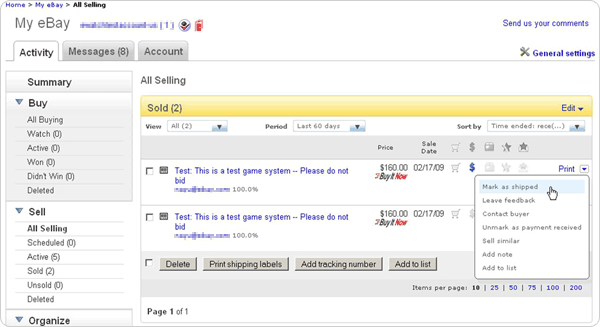
What if I do not want eBay to send an email automatically to my buyers when a tracking number is uploaded or an item is marked as shipped? You can turn off the automatic email:
Once a tracking or delivery confirmation number is available on eBay, you can find tracking details information in:
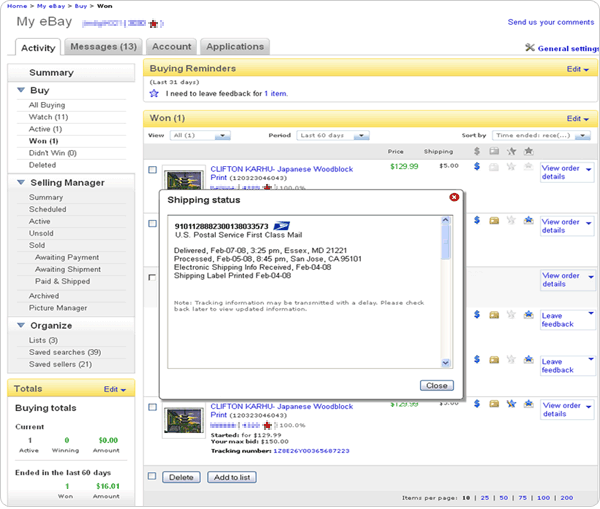
In My eBay Sold and Won, tracking or delivery confirmation numbers will display as a hyperlink below each item. Users can get tracking details in My eBay by clicking the hyperlinked tracking number. 
Return policy and handling time—deadline extendedWhen will my listings be required to include handling time and my return policy?Starting in mid-June 2009, all new listings and re-listings will be required to specify your handling time and return policy. You'll have until mid-September to update Good 'Til Cancelled listings. Why do you require handling time and return policy? We want to help narrow the gap between buyers' expectations and their experiences by providing this information up front. Buyers want to know when they can expect to receive their items and if they can return them. We'll calculate an estimated delivery date (a range of time) using your specified handling time and shipping service. Do I have to accept returns? We encourage you to accept returns, as this helps increase buyer satisfaction. However, you are not required to accept returns. You may specify "No Returns Accepted" as your return policy. What elements of my return policy do I need to specify? If you choose to accept returns, you'll need to specify the time period in which the item may be returned, how you'll give the refund, and who will pay the return shipping cost. Will all categories require handling time? No, not all categories will require handling time. Real Estate, Specialty Services, and all Motors listings (including both Vehicles and Parts and Accessories) will not require handling time. Will all listing formats require handling time? No. The following formats won't require handling time:
What if my item is available for local pickup? Do I still need to specify a handling time? If your item is available for local pickup only, you don't need to specify a handling time. If your item is available for local pickup and is also shippable, you'll need to specify a handling time for the other shipping method(s). How will delivery estimates be calculated? We calculate estimated delivery time based on your specified handling time and the estimated times provided to us by the shipping service. Delivery estimates are calculated as a range of days, not a specific date. How do you calculate delivery estimates for cross-border transactions? For cross-border transactions, we will display the seller's handling time (e.g., "This seller ships within two business days."), but we will not show an estimated shipping time because of potential delays in Customs. Are bulk editing tools available to update my Good 'Til Cancelled listings? Yes, the bulk editing tools are available now. Customized Item SpecificsWhat are customized Item Specifics?Item Specifics let you provide details about the item you're selling, such as its condition, size, color, or style. These details appear at the top of your listing description, in a consistent format, making it easy for buyers to get the facts about your item. eBay provides suggested Item Specifics in drop-down boxes during the listing process. However, if these suggestions don't work for your item, you can create your own value for an item specific. These are customized Item Specifics. What's the difference between an "item specific" and a "value"? An item specific is the type of detail you are including, such as color, size or condition. The value refers to the actual detail that describes your item. For example, "color" is an item specific. The values under that item specific could include blue, green, red and pink. Under the item specific "size", values could be small, medium and large. How are custom Item Specifics different from eBay Item Specifics? Custom Item Specifics differ from eBay Item Specifics in three main ways:
Custom Item Specifics are mix of eBay-recommended names and values, and popular names and values from other sellers in the category, so it's possible that values may differ from day to day as the popularity of individual values changes. Also, custom Item Specifics may not display all possible values in the drop-down boxes for each name. Based on the keywords in an item title, only the values that are most likely to be used will be shown. The list of Item Specifics does not include an important element of the item I am selling. What should I do? If the list of available custom Item Specifics does not appear to be complete in a given category, you can use the "Add your own item specific" link to add your own custom name and value. Your custom item specific will appear on the item page of your listing and be used in title and description search. If enough other sellers use the same item specific you added, it will begin to be recommended in the Sell Your Item flow to other sellers. The value list doesn't have the right values in it for the item I am selling. What should I do? If eBay has not provided a value that properly represents the item you are selling, you can enter your own custom value for most Item Specifics. However, the best practice is to use the Item Specifics recommended by eBay in the Sell Your Item flow as long as they accurately describe your item. For example, say eBay offers a custom item specific called "color" that has value choices of red, green, blue, pink and yellow. If you are selling a cornflower blue blouse, select the existing "blue" option rather than entering "cornflower." You can include "cornflower" in your item title or description. By using the existing "blue" value in your custom Item Specifics, your item is more likely to be found by buyers who use the left-hand navigation of the search results page to refine their search results. Conversely, if you are selling an orange blouse and eBay has not provided a value for "orange" you should enter a custom value for "orange." While "orange" may not be used in finding for this item, if enough other sellers enter "orange" and enough buyers buy items with this value, it will be available for refining searches in the future. How are custom Item Specifics used for browsing and search results? How do I know if the custom Item Specifics I entered will show up in the "Refine Searches" section? All custom Item Specifics that you have created will appear on the item page for each of your listings. All names and values on the item page will also be included in title and description searches. The most popular names and values used by sellers in each category can be included in the "Refine Search" section of the search results page. Currently, only certain categories will display Item Specifics on the search results page. Again, the best practice is NOT to use Item Specifics as a way to differentiate your listing. Whenever possible, it's best to use the Item Specifics recommended by eBay in the Sell Your Item flow as long as they accurately describe your item. (See example in answer above). 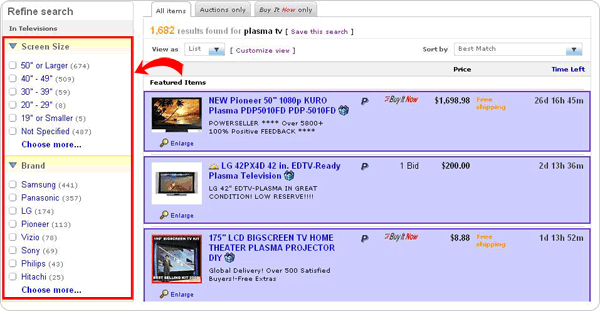 The most popular names and values used by sellers in each category may be included in the "Refine Search" section of the search results page.
Changes to Jewelry & Watches category policyWhy is eBay making changes to the Jewelry & Watches category?In an effort to make jewelry buying and selling simpler and less confusing, we have made some key revisions that should help you more easily understand where to list your items. These policy updates better differentiate between Fashion Jewelry and Fine Jewelry categories, and between authentic stones and simulated stones. These changes include more stringent categorization requirements, revisions to how manufactured stones are listed, and updates to item condition definitions. What are the major changes? We have provided additional guidelines for sellers listing in the Fashion Jewelry and Fine Jewelry categories to ensure a clear understanding of how to list these types of items. Sellers are no longer permitted to use the term "diamond" to describe an item other than a real diamond. This means that cubic zirconium, moissanite, quartz and other stones commonly described as "imitation" diamonds may only be referred to by their real names—cubic zirconium, moissanite, quartz, etc. I list Fine Jewelry items. How do the changes impact me? You may only list items in the Fine Jewelry categories if:
Items that do not meet both of these criteria may not be listed in the Fine Jewelry category. Instead, they must be listed in the appropriate Fashion Jewelry category. Also, none of the following is permitted in the Fine Jewelry category:
If your listings are in compliance with the above, no action is needed. I list Fashion Jewelry items. How do the changes impact me? You will need to remove all references to the term "diamond" if you are not selling a stone that has the exact mineral composition of a diamond. This means that all listings for imitation or simulated diamonds, including cubic zirconium, will need to be revised to comply. You must make these changes by mid-July, or your items will be removed. For example, if you list a cubic zirconia, you may call it a cubic zirconia but you are no longer permitted to use the term "diamond" anywhere in the listing (this includes the title, description, Item Specifics or images). If I have fine diamond jewelry items listed in the Fashion Jewelry category, do I need to move them? Yes. After June 15, the Fashion Jewelry category should only be used to list fashion/costume jewelry. All fine jewelry should be listed in an appropriate Fine Jewelry category. Fine diamond jewelry listings will be blocked from the Fashion Jewelry category beginning in mid-July. When will the changes take effect? The updated Jewelry, Precious Metals and Loose Beads Policy will go live the week of June 15, 2009. Enforcement of the new policy will begin in mid-July. How do these changes impact cross-border listings? Any listing that appears on eBay.com must comply with the eBay US Jewelry, Precious Metals and Loose Beads Policy. Your policy states, "eBay may remove jewelry listings that appear to misrepresent the nature or value of the item being sold." What does this mean? If eBay determines that the item for sale has been listed in a manner that may cause confusion or mislead shoppers about the actual item for sale, we may remove it from the site. For example, if a 1 carat diamond ring in a solid gold setting is listed with a Buy It Now price of $2.99, the price of this item calls into question the truthfulness of the item details. Whether there was an error when listing the item or the item has been deliberately misrepresented, these types of items will be removed to preserve trust and confidence in the eBay marketplace. What if I don't know the purity of the metal or the type of stone used in my item? You should avoid making any claims or statements about the item for sale if you are unable to verify that they are true. We recommend that you have the item appraised before listing it on eBay. For example, if you've received an item as a family heirloom but are unsure as to whether the metal is pure, you should not claim that it is or list it in a manner that leads one to believe that it is. If you do not know the properties of the item you are listing, you may not list it in the Fine Jewelry or Diamond categories. You are also not permitted to list it in the genuine gemstones categories. A category reserved for simulated stones or one of the "Other" categories is more appropriate. You may not promote the item as a real gemstone or with a pure metal if you cannot confirm these details. What about all of the old qualifiers for diamonds, gemstones and fake gemstones? We do require the use of appropriate qualifying terms for gemstones and the type of metal used in a piece of jewelry. However, we have made revisions to the policy that should help reduce the number and variety of qualifiers required to list jewelry on eBay. The diamond qualifiers that were singled out in the old policy no longer apply because you are only permitted to use the term "diamond" when you list a real diamond. Stones that are meant to look like diamonds may only be listed with their actual name - e.g., cubic zirconia, moissanite, rhinestone, etc. See a PDF with the update Jewelry, Precious Metals and Loose Beads Policy for complete details. Are you saying that I can no longer call my fake diamonds "imitation/simulated diamond"? Yes, that is correct. You are no longer permitted to use the term "diamond" unless you are selling an actual diamond. A diamond is a mineral that consists essentially of pure carbon, crystallized in the isometric system with a hardness of 10, a specific gravity of approximately 3.52, and a refractive index of 2.42. If you are listing a stone that does not share these properties, you may not use the term "diamond" to describe it. Why is this allowed for other gemstones but not for diamonds? For diamonds specifically, we want to ensure that there is no confusion between a real diamond and many of the look-a-like imitation and simulated stones for sale. These other types of stones often have their own names, which should be used in the listing instead of "diamond." For example, quartz shouldn't be called anything other than quartz on eBay. It does not have the same mineral composition as a diamond even though it might be polished and shaped to look similar. Because buyers naturally search for specific imitation gemstones, they may be described as such. However, imitation gemstones must be listed in an appropriate category (such as Simulated Stones), and you should identify the type of stone wherever you use the gemstone name in the title and description. For example, a glass bead that resembles a ruby may be described as an "imitation ruby" or a "simulated ruby." You mention "manufactured" stones. What does "manufactured" mean? The term "manufactured" refers to imitation or created stones that do not have the same mineral composition as a naturally mined gemstone or diamond. For example, a piece of colored red glass meant to resemble a ruby would be considered manufactured. Although it was created to look like the gem, it does not have the same mineral composition as a real ruby. How do I list manufactured stones? To list a manufactured stone (or any stone that does not have the same mineral composition as a naturally mined stone), you may list it in the Fashion Jewelry or the Engagement & Wedding categories. In these categories, you must also list it in the appropriate subcategory (such as Simulated Stones). You may not list manufactured stones in the Fine Jewelry categories. You are also required to fully identify your item as an imitation whenever you use the gemstone name in your listing title and description. For example, a manufactured glass ruby might be referred to as an "imitation ruby" or "simulated ruby." Note that this does not apply to diamonds. You are not permitted to use the term "diamond" unless you are selling a stone that has the exact mineral composition of a real diamond. Free Selling Manager with new applicationsWhat is Selling Manager?Selling Manager is an eBay online tool that streamlines your selling activity, helping you monitor active listings, generate bulk feedback, and print invoices and labels in bulk. Will Selling Manager be free for all sellers? What about Selling Manager Pro? Selling Manager will be free for all sellers starting June 15, 2009. There will continue to be a fee for Seller Manager Pro. I am currently a Selling Manager subscriber. When will I be charged my last subscription fee? You will see these changes reflected on the first invoice you receive after June 15, 2009. What else is changing with Selling Manager and Selling Manager Pro? In June, users will see a new summary page for both Selling Manager and Selling Manager Pro. The navigation on the summary page will change to become similar to that of My eBay. No existing functionality will be deleted, and all your settings will be carried over to the new summary page. Watch for a new section called "Account activity." We will also extend the available data for "At a glance" to 120 days. In addition, in late summer 2009, new Selling Manager and Selling Manager Pro applications will be available from third-party developers on a pay-for-subscription basis. These new applications offer a free trial period (minimum seven days) so you can try them out. What new third-party applications will be available for Selling Manager and Selling Manager Pro? New third-party tools will be available in late summer 2009, including research tools, customer support and shipping solutions. Developers may charge for some of these applications, while other tools will be free. Where can I find out when the new applications are available? Sellers can access the applications and all functionalities (browse for applications, subscribe, contact support) through the "application" tab. This tab will become visible for all Selling Manager and Selling Manager Pro subscribers in mid-June. Pay for shipping and print labels on eBayWhy are you adding label printing functionality to My eBay?Having label printing abilities in My eBay will save you the time and trouble of moving between the eBay and PayPal sites to print your labels. Everything will be conveniently located right within My eBay for faster, more efficient shipping and a more consistent user experience. When I click on the "Print shipping label" link, I still see the PayPal shipping label printing application. Why am I not seeing the new eBay application? We will be showing the new eBay application gradually to more and more sellers over the next few months. How does eBay label printing help me? With our label printing service, you can:
Watch this 2 minute shipping labels video. Will I be able to print labels for USPS and UPS via eBay's label solution? At launch, you will only be able to print USPS labels via eBay's label printing solution. If you want to print UPS labels, you need to continue to use PayPal's label printing solution. In the future, UPS label printing will also be available through eBay. How do I print a label after my item sells? From My eBay:
When you print shipping labels on eBay or PayPal, you can save on shipping costs, and save yourself a lot of time:
Yes. You can print international shipping labels from both eBay and PayPal to serve your global buyers. The buyer's international address is pre-filled on the shipping label, and you can easily complete and print the required customs forms directly on eBay. Does the eBay label printing service include multi-order shipping? No. At this time, multi-order shipping is not available on eBay, but you can still use multi-order shipping on PayPal. How do I pay for USPS labels? You can pay for shipping labels safely and conveniently using your PayPal account. Can I request a free carrier pick-up for USPS? Yes. After you have printed your label, simply request a pickup from USPS in order to save gas and a trip to the post office. USPS free carrier pickup can only be used if you are shipping at least one Priority Mail or Express Mail package. You and your buyer can then track the package right in My eBay, since USPS labels have delivery confirmation. Will there be support for large and small flat rate box? Yes. eBay's label printing solution will support both the large and small USPS flat rate box. How many sites will be supported by eBay's label printing functionality? Only the US site will be supported at launch. We plan to extend the support to other international sites in the future. Can you reprint a label? Yes. If the label did not print properly, you can reprint it again within 24 hours. Will buyer and seller receive emails when a label is printed? An email is automatically sent to you and the buyer when you purchase a shipping label through eBay. The email includes details on how to track the package, and helps reduce the number of questions from buyers inquiring about the status of their shipments. What if I do not want eBay to send an email automatically to my buyers when a shipping label is printed? You can turn off the automatic email:
Tools to bulk edit your listingsHow do I revise my listings to meet the new requirements?You can revise your listings in three ways using eBay's tools:
Yes, you can use these tools to specify your return policy or to specify more details about your return policy. You can add the fields using the Sell Your Item Form, in bulk using Bulk Relist, or within Turbo Lister. What about revising Multi-Quantity Fixed Price and Store Inventory Format items that have a sale? You can add a shipping service, add quantity, revise price, and add a return policy and handling time for multi-quantity Good 'Til Cancelled listings with a sale. At this time, it is not possible to add item condition, edit your listing description, or modify other Item Specifics on a multi-quantity listing with a sale. We are looking at ways to support this by mid-summer. |


