
eBay Coupons Frequently Asked Questions (FAQ's)
General
- What is a coupon and are there any requirements?
- Do I have to have an eBay account to use a coupon?
- Do I need to have a PayPal account to redeem a coupon?
- Can I use more than one coupon at a time?
- Can a coupon be redeemed more than once?
- Who can I contact if I am having trouble using a coupon?
- Can I give my coupon to someone else?
- How can I confirm that an item is eligible for a coupon?
- Why doesn't my PayPal transaction total amount accurately reflect my applied coupon discount?
Redeeming coupons
- How do I redeem my coupon?
- Can I use my coupon with any item?
- If my coupon doesn't cover the whole transaction amount how do I pay for the remainder?
- Do coupons expire?
- What happens if I pay for an item with a coupon and then the payment is reversed?
- Can I combine coupons with a Gift Certificate to purchase an item on eBay?
- What happens if I make a purchase for less than the face value of the coupon or the maximum discount amount?
Seller Questions
- How do coupons benefit sellers?
- As a seller, what do I have to do to accept coupons?
- Will I know if a buyer has used a coupon on a payment?
- If a buyer uses a coupon, will the payment I receive change?
General
What is a coupon and are there any requirements?
Coupons are discounts offered to and redeemable by the recipient for use on items listed and purchased on eBay. You must meet all the criteria of the coupon offer in order to redeem the coupon. The coupon offer criteria will vary depending on the offer. Coupons must meet the following requirements:
- Items must meet all coupon criteria as stated in the coupon offer which include, but are not limited to, minimum and/or max purchase requirements, category/item restrictions, coupon reuse limitations, and expiration date.)
- The coupon has not expired.
Do I have to have an eBay account to use a coupon?
See coupon terms and conditions for eligibility requirements, including whether a registered account is required for redemption.
Do I need to have a PayPal account to redeem a coupon?
No, you do not need a valid PayPal account in order to redeem your coupon.
Can I use more than one coupon at a time?
No, only one coupon may be used per purchase.
Can a coupon be redeemed more than once?
Most eBay coupons are limited to one-time use. Please check the terms and conditions of your coupon to see how many times the coupon may be used.
Who can I contact if I am having trouble using a coupon?
If you have trouble using a coupon, please contact us.
Can I give my coupon to someone else?
It depends on the terms and conditions of the offer. Some coupons can only be redeemed by you and thus cannot be shared. If the coupon appears in your My eBay account, the coupon may only be redeemed by you through that eBay account and its associated User ID. Therefore, it cannot be resold or transferred in any way.
If the coupon does not appear in your My eBay account, it is possible you may share the coupon code with someone else. Please check the Terms and Conditions of the coupon for details.
How can I confirm that an item is eligible for a coupon?
To see if an item is eligible for a coupon, please refer to the coupon criteria stated in the offer.
Why doesn't my transaction total amount accurately reflect my applied coupon discount?
To clarify whether your coupon discount was applied, please see your 'eBay Order Confirmation' email for complete details.
Redeeming coupons
How do I redeem my coupon?
After you have selected the item(s) you'd like to purchase, please proceed to the checkout page and enter the coupon code in the "Coupon, gift cards, or certificate" redemption field. Once you've entered the coupon code and click "apply" your total will reflect the applied discount.
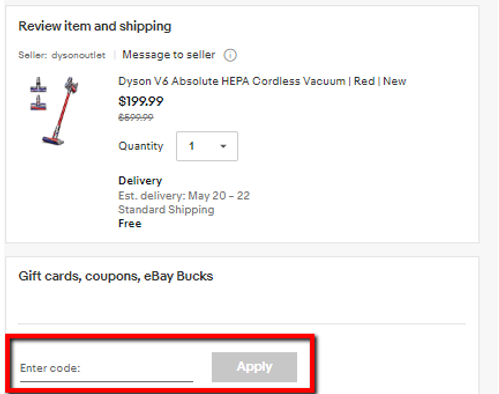
If you are using a mobile device, select the "Gift Cards, eBay Bucks, and Coupon" on the "Review Order" screen. If a coupon is available for you, it will appear on this screen and you'll need to check-mark the coupon during checkout.
If a coupon is not available, but you have an eligible coupon code, please enter the redemption code in the "Gift Cards, eBay Bucks, and Coupon" field.
Can I use my coupon with any item?
You can use your coupon with any item(s) that meets the offer's eligibility requirements. Eligibility requirement will vary depending on the offer, please be sure to read through the coupon offer.
If my coupon doesn't cover the whole transaction amount, how do I pay for the remainder?
The remaining balance can be paid with any of your other valid funding sources displayed at checkout.
Do coupons expire?
Yes, all of our coupons have an expiration date, which is listed on the coupon.
What happens if I pay for an item with a coupon and then the payment is reversed?
You will receive a refund for the entire portion of the purchase you paid for. Single-item coupons will also be returned, but their original expiration dates will still apply.
Can I combine coupons with a Gift Certificate to purchase an item on eBay?
No, a coupon cannot be combined with any other Coupon, Gift Card, Gift Certificate, or Voucher.
What happens if I make a purchase for less than the face value of the coupon or the maximum discount amount?
Any unused difference between the actual amount of the discount received and maximum amount will be forfeited.
Seller Questions
How do coupons benefit sellers?
Coupons may increase the number of bidders and buyers on eBay, and may encourage recipients to bid more and on higher value items.
As a seller, what do I have to do to accept coupons?
Coupons are automatically converted to regular currency at the time of redemption, so sellers will not be aware that a coupon has been used to fund the payment.
Will I know if a buyer has used a coupon on a payment?
No, since coupons are automatically converted to regular currency at the time of redemption, you will not be aware that a coupon was used to fund the payment.
If a buyer uses a coupon, will the payment I receive change?
No, you will still receive a single payment.